What Is Investment Adviser Tool?
Investment Adviser Tool is a SaaS solution that helps New Zealand financial advisers manage their investment advice process more efficiently. It streamlines their workflow from Fact Find through to Statement of Advice, Authority to Proceed/client sign-off, helping advice businesses reduce administration, improve consistency and deliver advice in a secure digital environment.
Table of Contents
- How does Investment Adviser Tool work?
- Who is Investment Adviser Tool designed for?
- What is the difference between Investment Lite and KiwiSaver Pro?
- What features are included?
- What other features are available?
- What problems does Investment Adviser Tool solve?
- How does it support compliance-ready processes?
- How does it help advisers save time?
- Can it be customised?
- Is client data secure?
- Frequently asked questions
How Does Investment Adviser Tool Work?
Investment Adviser Tool guides advisers through the investment advice process from collecting client information through to recommendations, client approval and record keeping. The platform is designed to help advisers manage their workflow more efficiently while maintaining a consistent process.
Fact find
Collect client information digitally and create a consistent starting point for every advice engagement.
Statement of Advice
Generate investment recommendations using a structured Statement of Advice process and template.
Authority to Proceed
Capture client approval and maintain a record of sign-off including date and time information.
Client sign-off
Offer online authorisation or in-person signing options to suit different client preferences.
Projection Tool
For Investment Pro users, Projection Tool uses Fact Find information to project how investments may perform over a client’s lifetime and allows advisers to update projections in real time during client meetings.
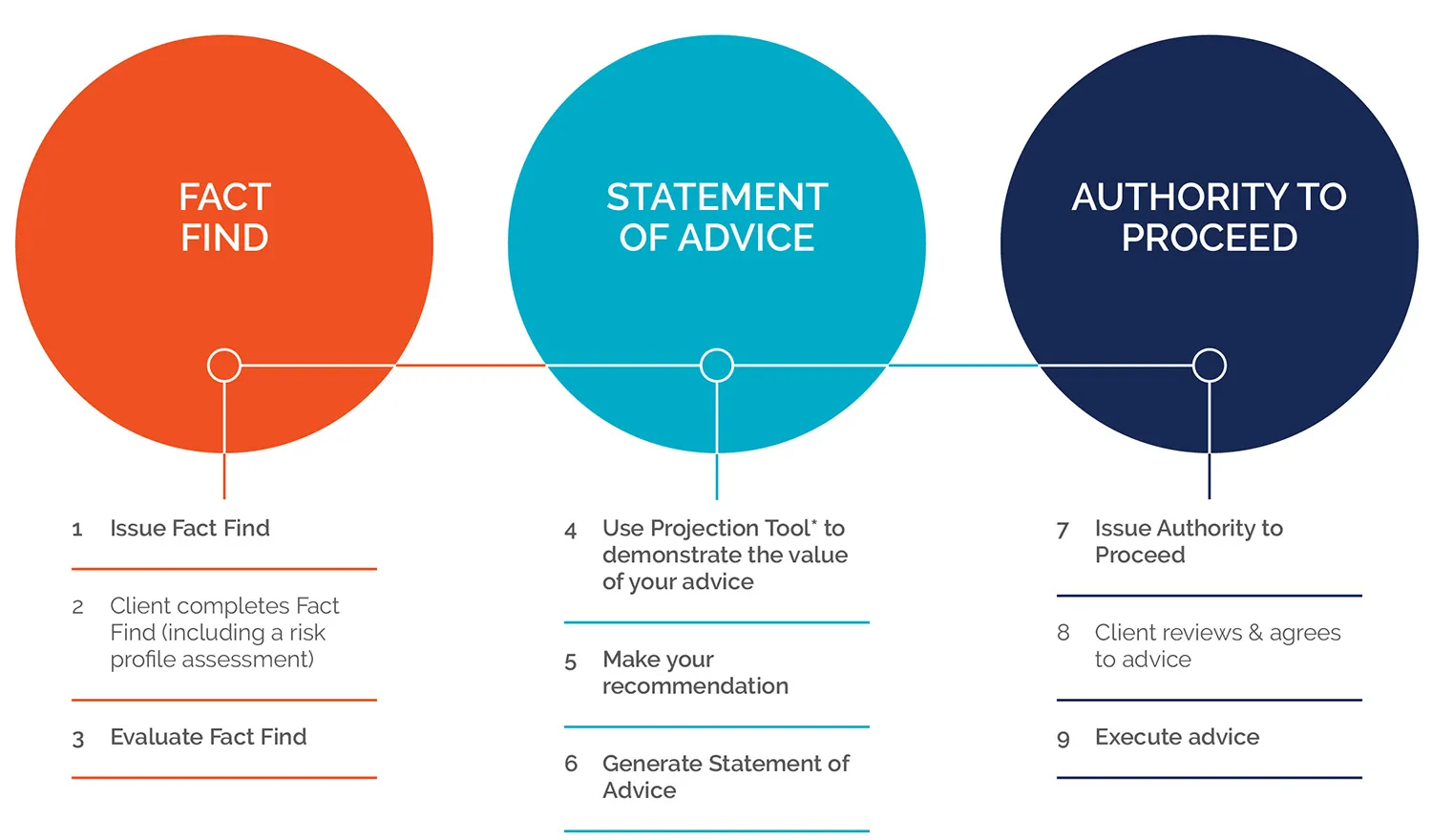
* Projection Tool is an optional feature.
Who Is Investment Adviser Tool Designed For?
Investment Adviser Tool is designed for New Zealand financial advisers who provide investment advice. It can be used by sole advisers, adviser teams, advice businesses, and financial services organisations looking to streamline their advice process.
What Is the Difference Between Investment Lite and Investment Pro?
Investment Lite covers the advice workflow from Fact Find to SOA generation and client approval/sign-off.
Investment Pro includes the same features as Investment Lite but also includes our Projection Tool, reporting and integration with GBG for AML checks.
What Features Are Included?
Both Investment Lite and Pro include these features:
Cloud-based Access
Both advisers and clients can access the platform from anywhere at any time.
Quarterly Fund Updates
Ensure you have the latest fund performance, fees, and asset allocation data.
Historical Performance
View funds 1 year return plus 3-, 5- and 10-year average returns in the fund comparison.
Signing Rules
Tailor signing requirements for different client structures such as trusts and companies.
Your Branding
Apply your logo and brand colours across documents and client communications.
Your Providers
Configure the platform with your preferred investment providers.
Disclosure
Provide clients with the right disclosure information at every step.
Signoff Tracking
See sign-off dates and times for a clear record.
Signoff Options
Offer flexible signoff – choose from online or in person.
Document Version Control
Easily track document versions to keep records up to date.
What Other Features Are Available?
Investment Pro includes these additional features:
- Projection Tool
- Integration with GBG for AML checks
- Report library access
What Problems Does Investment Adviser Tool Solve?
Investment Adviser Tool helps advisers address common operational challenges, including:
- Preparing investment advice documents manually
- Maintaining consistent advice processes across advisers
- Capturing and tracking client approvals
- Managing document versions and records
- Coordinating client information and recommendations
- Delivering advice efficiently in a digital environment
- Providing secure access to information
How Does Investment Adviser Tool Support Compliance-Ready Processes?
Investment Adviser Tool includes features designed to help advice businesses follow a structured and repeatable advice process.
This includes:
- Consistent document templates
- Electronic client sign-offs
- Disclosure management
- Sign-off tracking
- Configurable signing rules
The result is a more organised advice process with greater visibility over client interactions and documentation.
How Does Investment Adviser Tool Help Advisers Save Time?
Can Investment Adviser Tool Be Customised?
Yes, it can.
Your branding
Apply your logo, colours and branding throughout the platform, documents and client communications.
Your providers
Use your preferred investment providers within the solution.
Additional custom development
Existing features can be customised and new functionality can be developed to meet specific business requirements.
Is Client Data Secure?
The security of adviser and client data is a key focus of Investment Adviser Tool.
Secure Infrastructure
Built on secure, managed infrastructure designed for reliability.
Microsoft Azure Hosting
Hosted on Microsoft Azure infrastructure, providing a secure and scalable environment.
Encrypted Data Protection
Multi-factor Authentication
MFA is required for advisers, and 2FA for clients, providing an additional layer of account security.
Frequently Asked Questions
Find answers to some of the most common questions advisers ask about Investment Adviser Tool.
TL;DR
- Streamlines the investment advice process from Fact Find to client sign-off.
- Generates Statements of Advice using a structured workflow.
- Supports secure client approvals and record keeping.
- Provides cloud-based access for advisers and clients.
- Includes branding, provider and signing-rule configuration.
- Offers Projection Tool for investment modelling and client engagement (Investment Pro only).
- Helps advice businesses operate more efficiently.